
Free format7 min read
Prescription format
A free prescription format for doctors in India: what goes on your pad, and how to write each medicine.

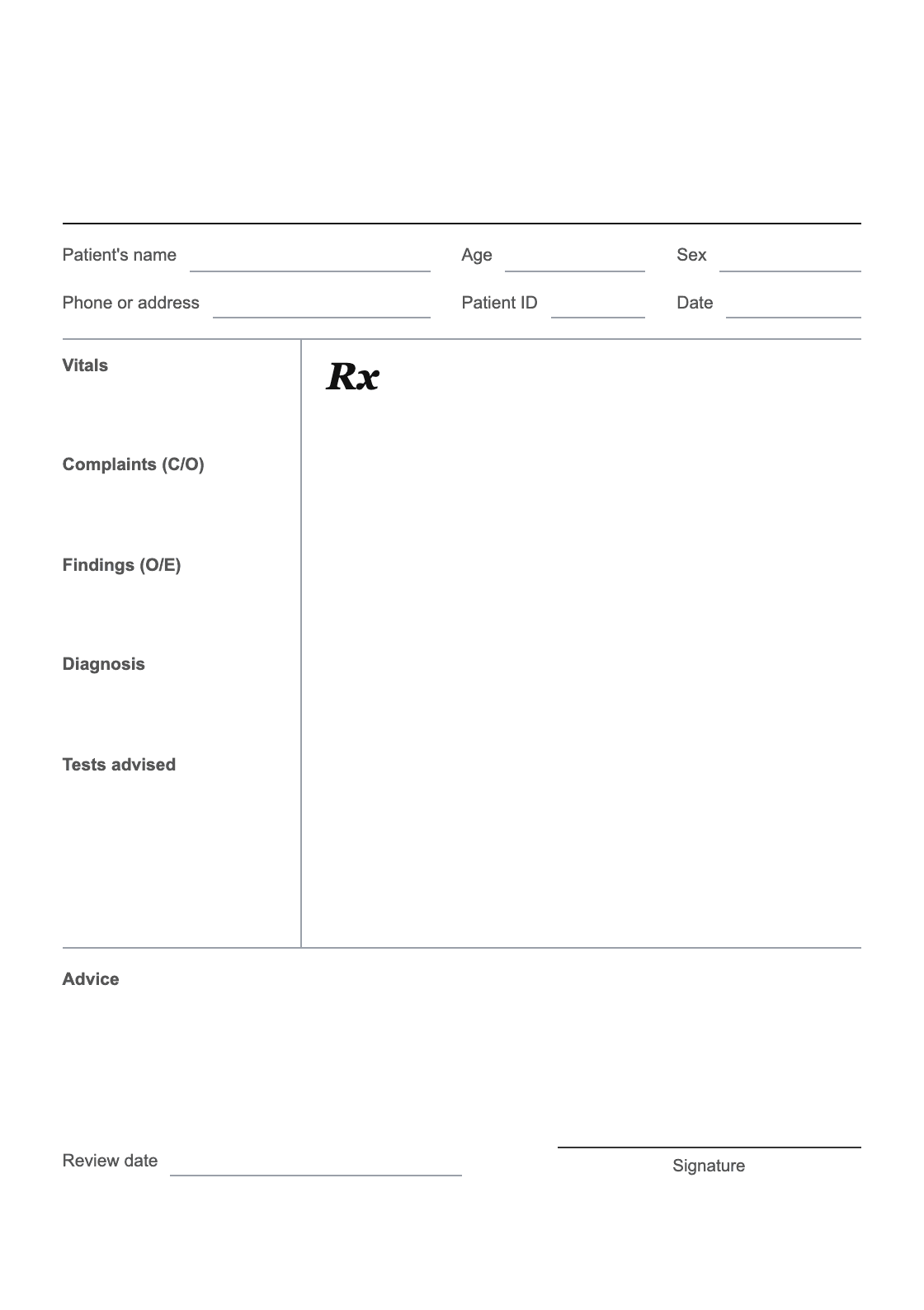
Free prescription format
- Print it on A5 or A4 and stamp your name at the top
- Or add your details in Word and take it to a print shop
- Blank A5, blank A4, then a filled sample
Free · no sign-up
MediKloud is clinic management software for doctors in India. It prints each prescription on the doctor's own pad, or on plain paper with their name and clinic at the top. For doctors with pre-printed pads: see how.
To type a prescription on screen instead, use the free prescription writer at the end of this article. It lays it out on A4 or A5 to print or save as a PDF. Nothing you type leaves your browser.
Your pad, part by part
Prescription pad format
Some details are printed on every sheet of your pad. You write the rest for each patient.
Printed on every sheet
- Your name, your degrees (such as MBBS, MD) and your specialty
- Your registration number
- The clinic's name, address and phone number
- The days and hours you see patients, and the day you are closed
Written for each patient
| Part | What to write |
|---|---|
| 1Date | |
| 2Patient | name, age, sex and phone number or address, with their patient ID if you give one |
| 3Vitals | weight, BP, pulse and temperature |
| 4Complaints | and for how long |
| 5Findings | on examination |
| 6Diagnosis | |
| 7Tests advised | |
| 8Rx | the medicines, one on each line |
| 9Advice | and when to come back at once |
| 10Review date | |
| 11Your signature | and your stamp if you use one |
- A narrow left column. Many pads keep a narrow column on the left for complaints and findings. The wide right side is for Rx.
- Short forms. Doctors often write C/O for complaints, O/E for findings on examination and Adv for advice.
- A plain writing space. Skip ruled lines. Text from a printer rarely sits on them, and a plain space lets you print on the same pads from clinic software later.
The Rx lines
How to write medicines on a prescription
Write one medicine on each line under Rx. Some parts of the line are mainly for the chemist, and some for the patient.
| Part of the line | Example | Mainly for |
|---|---|---|
| Form | TAB. for tablet. Also CAP. (capsule), SYP. (syrup) and INJ. (injection) | Chemist |
| Name | PARACETAMOL, the generic name, in capitals | Chemist |
| Strength | 650 mg | Chemist |
| Dose | 1 tablet | Patient |
| How often | 1-1-1 | Patient |
| When | After food | Patient |
| For how long | 3 days | Patient |
| Quantity | 9 tablets | Chemist |
Written out, the line reads: TAB. PARACETAMOL 650 mg, 1 tablet, 1-1-1, after food, 3 days (9 tablets).
- 1-1-1 means one in the morning, one in the afternoon and one at night. 1-0-1 is morning and night. 0-0-1 is night only.
- Some doctors write OD (once a day), BD (twice a day), TDS (three times a day) or HS (at bedtime) instead
- SOS means only when needed, such as for pain
- Capital letters help the chemist read the name. The quantity tells them how much to give.
In MediKloud, you choose the dose, how often and for how many days, and the quantity is worked out for you. More: prescriptions without typing.
Filled in
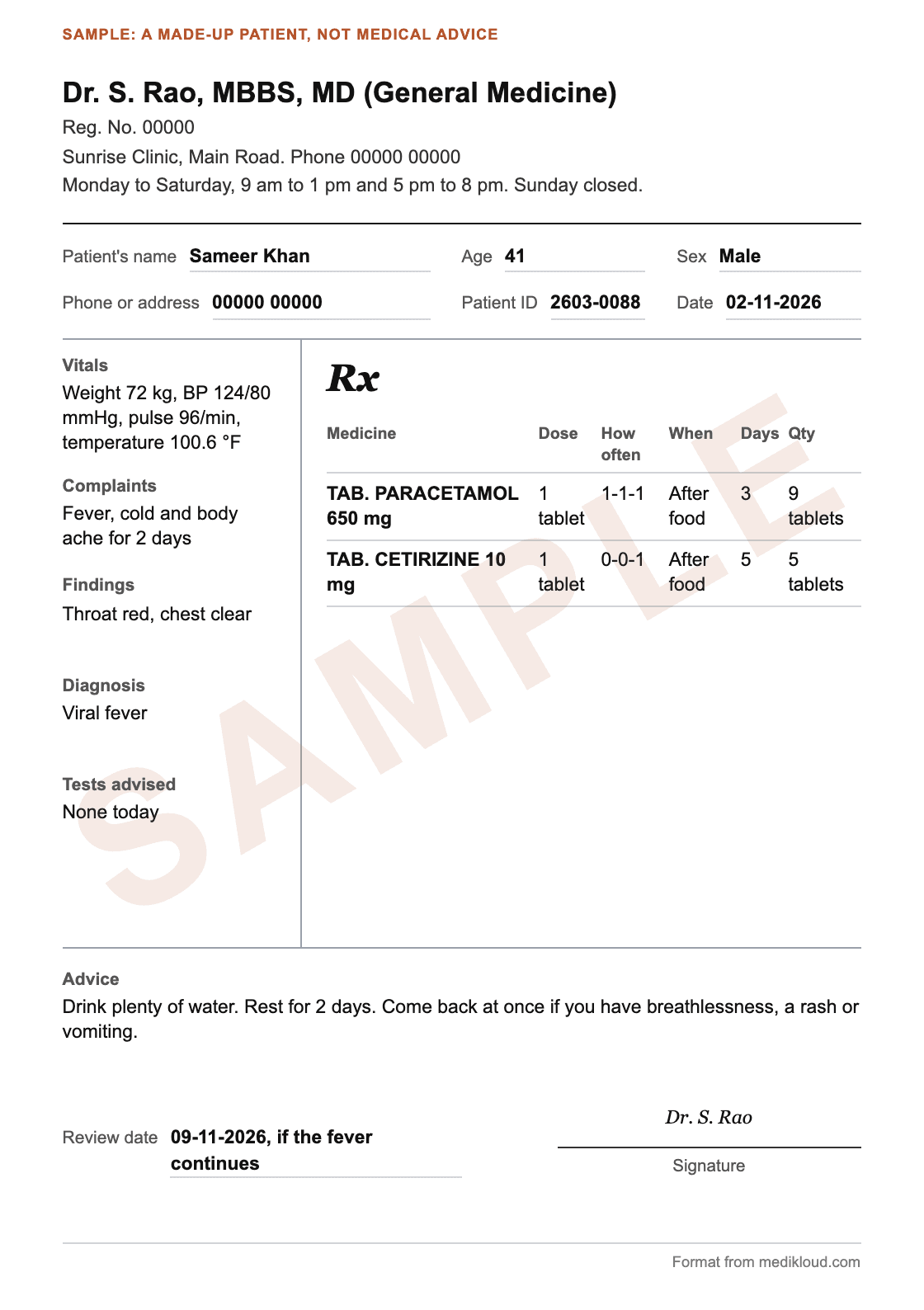
Doctor prescription format: a filled sample
Here is the format filled in for Sameer Khan, a made-up patient with fever. It is not medical advice.
- Doctor
- Dr. S. Rao, MBBS, MD (General Medicine). Reg. No. 00000
- Patient
- Sameer Khan, 41, male. Phone 00000 00000. Patient ID 2603-0088
- Vitals
- Weight 72 kg, BP 124/80 mmHg, pulse 96/min, temperature 100.6 °F
- Complaints
- Fever, cold and body ache for 2 days
- Findings
- Throat red, chest clear
- Diagnosis
- Viral fever
- Tests advised
- None today
Rx
| Medicine | Dose | How often | When | Days | Quantity |
|---|---|---|---|---|---|
| TAB. PARACETAMOL 650 mg | 1 tablet | 1-1-1 | After food | 3 | 9 tablets |
| TAB. CETIRIZINE 10 mg | 1 tablet | 0-0-1 | After food | 5 | 5 tablets |
- Advice
- Drink plenty of water. Rest for 2 days. Come back at once if you have breathlessness, a rash or vomiting.
- Review date
- 09-11-2026, if the fever continues
- Signature
- Dr. S. Rao
Dental prescription: the same format works. Write the tooth number in the findings, and add a line for the work done, such as "Tooth 36: root canal treatment, first sitting". More: dental clinic software.
Your own pad
Can MediKloud print on the pad I already use?
Yes. Keep your pad. MediKloud prints only the part written for each patient, in the blank space of the pad. You line it up once. When we set up your clinic, our team shows you how.
Line up your pad once
- SizeChoose your pad's size: A4, A5 or any other size you measure.
- PhotoTake a photo of one blank sheet. It shows behind the prescription on your screen, so you can see where each line will print. The photo never prints.
- Keep clearOn the photo, place a box over each part already printed, such as your name and clinic at the top. Nothing prints inside those boxes.
- Test sheetFor an exact fit, print a test sheet on one blank sheet of your pad. It has a grid of 5 mm squares. Use it to measure where each printed part starts and ends, and type those numbers into MediKloud.
- NudgeIf your printer prints a little to one side, move all the print by a few millimetres.
- PrintFrom now on, each prescription prints in the blank space of your pad, with your signature.
Each doctor in the clinic can use their own pad. Ask your staff to print at actual size, not "Fit to page", so the print does not shift.
Plain paper, or your own handwriting
- On plain paper. Your name and clinic details are set once, and they print at the top of every prescription.
- Written by hand. Write with a pen on a tablet. The printed page has the patient's details typed at the top, and your handwriting below.
More: clinic management software and EMR software for clinics.
Questions about prescription formats
- What are the 7 parts of a prescription?
Many textbooks list these seven: the date; the patient's name, age, sex and address; the superscription, the Rx sign that starts the medicines; the inscription, each medicine's name, strength and form; the subscription, how much the chemist should give; the signa, how the patient should take it; and the doctor's signature, name, degrees and registration number. Some lists add an eighth part, refill instructions. On the format above, parts 3 to 6 are the medicine lines.
- How do you write a prescription?
Start with the date and the patient's name, age and sex. Note the vitals, complaints, findings and diagnosis in a few words. Under Rx, give each medicine its own line: form, generic name in capitals, strength, dose, how often, when, days and quantity. End with the advice, the review date and your signature.
- What size should a prescription pad be?
A5, half the size of A4, is a common size. Some doctors use A4, or a size between the two. If you may print from clinic software later, check that your printer takes your pad's size. In MediKloud, each doctor sets their pad's size: A4, A5 or any size they measure.
- Can I use this format for a handwritten prescription?
Yes. Print the PDF and write on it by hand, with the medicine names in capital letters. In MediKloud you can also write with a pen on a tablet, and the patient's details print typed at the top.
- Can I write a prescription online for free?
Yes. Use the prescription writer on this page. Type your details and registration number, then the patient and the medicines. Print it on A4 or A5, or save it as a PDF from the print window. It runs in your browser: nothing you type is sent or saved, and there is no sign-up.
- Can clinic software print on my own letterhead?
Yes, if it lets you line up your pad. In MediKloud, each doctor's pad is lined up once, with a photo of a blank sheet and a test print. After that, every prescription prints in the blank space of the pad. Nothing prints over your name and clinic at the top.