
Free form9 min read
Patient admission form
A free admission form in seven parts. Each part says who fills it: the doctor's note, the patient or attendant, or the desk. It covers the bed and its rent, insurance and TPA, the advance and consent.

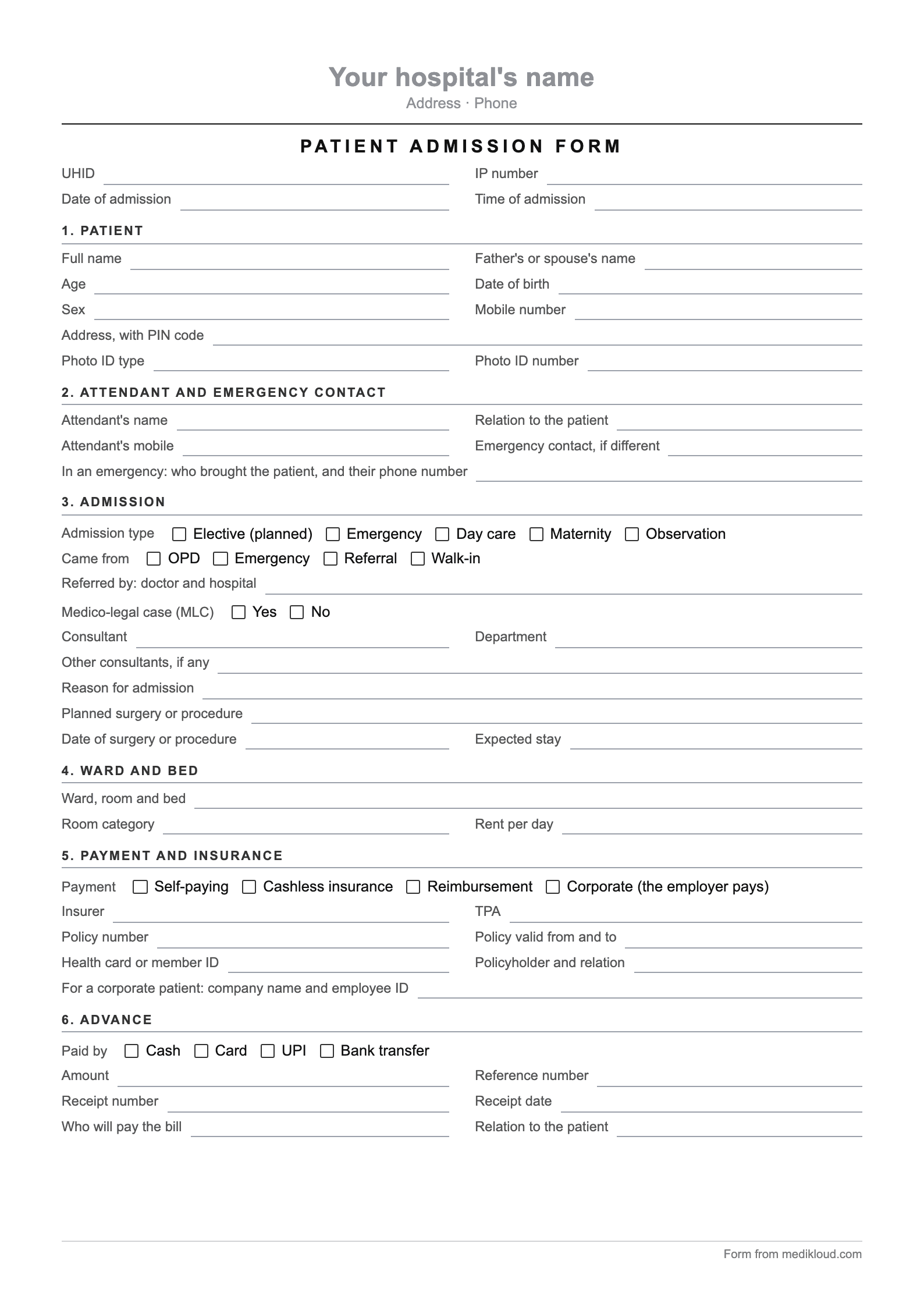
Free patient admission form
- Two A4 pages: the details on page 1, the consent on page 2
- Add your hospital's name and logo in the Word file
- A filled sample follows the blank form
Free · no sign-up
This form comes from MediKloud, hospital management software for private hospitals and nursing homes in India. When a doctor refers a patient from OPD, the admission screen opens with the patient's details filled in. More: IPD and bed management software.
To fill the form on screen instead, use the free admission form maker at the end of this article. Print it on A4 or save it as a PDF, filled in or blank. Nothing you type leaves your browser.
The form, part by part
Patient admission form format
The top of the form, then seven parts, in the order the desk fills them. Each part says who gives the answers, with a sample entry and one thing to check.
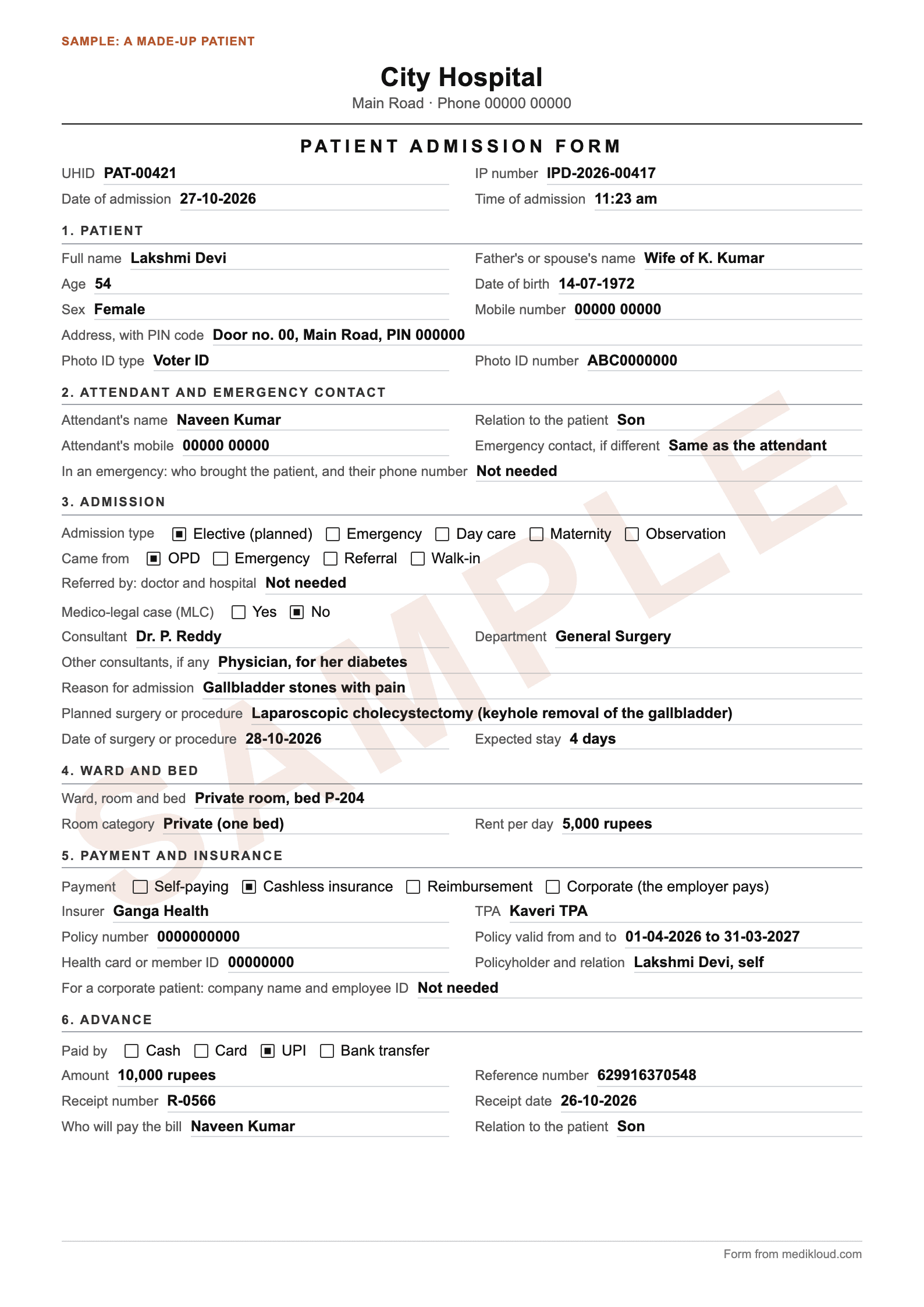
The sample is a made-up patient: Lakshmi Devi, 54, admitted to City Hospital for a planned gallbladder surgery.
At the top
The desk fills this.
| On the form | Sample entry |
|---|---|
| Hospital name, address and phone | City Hospital, printed at the top |
| UHID (the patient's ID number at your hospital) | PAT-00421 |
| IP number (a new number for each admission) | IPD-2026-00417 |
| Date and time of admission | 27-10-2026, 11:23 am |
Check: Write the time as well as the date. The bill and the insurance claim both use it.
1. Patient
Ask the patient or attendant.
| On the form | Sample entry |
|---|---|
| Full name | Lakshmi Devi |
| Father's or spouse's name | Wife of K. Kumar |
| Age and date of birth | 54, born 14-07-1972 |
| Sex | Female |
| Mobile number | 00000 00000 |
| Address, with PIN code | Door no. 00, Main Road, PIN 000000 |
| Photo ID: type and number | Voter ID, ABC0000000 |
Check: Write the name exactly as it is on the photo ID and the health card. A different spelling can delay an insurance claim.
2. Attendant and emergency contact
Ask the attendant.
| On the form | Sample entry |
|---|---|
| Attendant: name, relation and mobile number | Naveen Kumar, son, 00000 00000 |
| Emergency contact, if different | Same as the attendant |
| In an emergency: who brought the patient, and their phone number | Not needed |
Check: Call the attendant's number once from the desk, so you know it works.
3. Admission
Copy from the doctor's admission note.
| On the form | Sample entry |
|---|---|
| Admission type (tick one): elective (planned), emergency, day care, maternity or observation | Elective (planned) |
| Came from (tick one): OPD, emergency, referral or walk-in | OPD |
| Referred by: the doctor and hospital, for a referral | Not needed |
| Medico-legal case (MLC), such as an accident or assault: yes or no | No |
| Consultant and department | Dr. P. Reddy, General Surgery |
| Other consultants, if any | Physician, for her diabetes |
| Reason for admission | Gallbladder stones with pain |
| Planned surgery or procedure, with the date | Laparoscopic cholecystectomy (keyhole removal of the gallbladder), 28-10-2026 |
| Expected stay | 4 days |
Check: Let the doctor decide the medico-legal box. The desk should not guess it.
4. Ward and bed
The desk fills this.
| On the form | Sample entry |
|---|---|
| Ward, room and bed | Private room, bed P-204 |
| Room category and rent per day | Private (one bed), 5,000 rupees a day |
Check: Tell the family the room category and its rent before they sign. Many health policies pay room rent only up to a limit.
5. Payment and insurance
Ask for the health card and policy.
| On the form | Sample entry |
|---|---|
| Payment (tick one): self-paying, cashless insurance, reimbursement, or corporate (the employer pays) | Cashless insurance |
| Insurer and TPA | Ganga Health, through Kaveri TPA |
| Policy number and policy dates | 0000000000, valid 01-04-2026 to 31-03-2027 |
| Health card or member ID | 00000000 |
| Policyholder, and relation to the patient | Lakshmi Devi, self |
| For a corporate patient: company name and employee ID | Not needed |
Check: Make sure the policy is valid on the date of admission.
6. Advance
The desk fills this.
| On the form | Sample entry |
|---|---|
| Amount | 10,000 rupees |
| Paid bycash, card, UPI or bank transfer, with the reference number | UPI, ref. 629916370548 |
| Receipt number and date | R-0566, 26-10-2026 (paid the day before, when the bed was booked) |
| Who will pay the bill, and their relation to the patient | Naveen Kumar, son |
Check: Give a receipt for every advance, and write its number here.
The form, continued
Part 7: the consent and the signatures
The patient or attendant signs.
A short, general consent: I agree to be admitted to this hospital under the consultant named above. I agree to the tests and treatment my doctors advise. The room category, its rent and the advance have been explained to me. I will follow the hospital's rules. I will pay the bill, including any part that my insurer does not pay. The details I have given on this form are true. I allow the hospital to share my medical records with my insurer and TPA for my claim.
| On the form | Sample entry |
|---|---|
| Patient's name, UHID and IP number (printed again at the top of page 2) | Lakshmi Devi, PAT-00421, IPD-2026-00417 |
| Patient's signature, with date and time | Signed by Lakshmi Devi, 27-10-2026, 11:15 am |
| If the patient cannot sign: who signs, their relation, and why | Not needed |
| Witness: staff name and signature | Signed, admission desk staff, 11:15 am |
| Received on the ward: nurse's name and time | Anitha, staff nurse, 11:45 am |
Check: Fill in every line before the patient signs. Strike out any line left empty.
Before you use this consent, have your hospital's legal adviser check it. Explain it in a language the patient understands. Most hospitals take a separate consent for surgery, anaesthesia and blood transfusion.
Checklist
Which papers are needed for hospital admission?
The desk collects this paperwork and keeps copies with the admission form, in the patient's file.
- The patient's photo ID
- The doctor's admission note, or a referral letter from another doctor or hospital
- For an insured patient: the health card and the policy papers
- For a corporate patient: the employee ID card as well
- Old reports, and a list of the medicines the patient takes now
- The advance receipt
- The signed admission form and consent
The papers the TPA asks for are on insurance and TPA claims.
The same admission, on screen
How admission works in MediKloud
The same admission in MediKloud, told by the same three people.
From the doctor
In OPD, the doctor refers the patient for admission from the case sheet. At the desk, the admission screen opens with the patient's details already in it.
At the desk
- See the vacant beds in each ward, with each bed's room category and rent per day.
- Mark the admission type and where the patient came from. For a referral, add the referring hospital and doctor.
- Choose the consultant, and add more consultants if needed.
- Record the emergency contact, and the insurer and TPA. Add copies of the health card and policy to the patient's record.
- Take the advance by cash, card, UPI or bank transfer.
From the patient
The patient signs the consent on paper: your own form, or page 2 of this one. Scan it and add it to the patient's record in MediKloud.
When the admission is saved
- The inpatient bill opens, and a bed charge is added for each day of the stay.
- The advance receipt is ready to print.
- For an insured patient, the claim starts on the claims list, with the insurer and TPA.
- The bed shows as occupied on the bed board.
For a planned admission, enter it a day or two before the patient comes. Reserve the bed and take the advance. If the patient does not come, the bed is released a set number of hours after the expected arrival time. Your hospital sets the number of hours. When the patient arrives, the desk turns it into the admission.
Next, the nurse and the doctor fill in the admission assessment. Ward rounds, nursing, the OT and discharge all add to the same patient file.
More: IPD and bed management software, insurance and TPA claims and hospital management software.
Questions about patient admission
- What is a patient admission form?
A patient admission form is the paper a hospital fills in when a patient is admitted for a stay. It is the first page of the patient's file for that stay. The patient or a relative signs it to agree to the admission and the charges.
- What should a hospital admission form include?
It starts with the patient's details, photo ID and an attendant to contact. Then come the doctor's admission details, the ward and bed, and payment and insurance. Last are the advance and the signed consent.
- Can I fill in a patient admission form online for free?
Yes. Use the free admission form maker on this page. Type the patient, the attendant, the doctor, the bed, the payment and the advance, then print the two A4 pages or save them as a PDF. You can also print it blank and fill it in by hand. It runs only in your browser, and nothing you type is sent or saved.
- What is the admission process in a hospital?
The doctor advises admission. The desk fills in the form, allots a bed, takes an advance and checks the insurance. The patient or attendant signs the consent. A staff member then takes the patient to the ward for the admission assessment.
- What is the IP number on an admission form?
The IP (inpatient) number is the hospital's number for one admission. The UHID is the patient's own ID number at the hospital, and it stays the same for every visit. A patient admitted twice has one UHID and two IP numbers.
- Is the consent on the admission form enough for surgery?
No. The admission form has a general consent for the stay. Before surgery, anaesthesia or a blood transfusion, hospitals take a separate consent that names the procedure and its risks. In MediKloud, the OT team marks this consent as taken on the pre-op checklist.
- Can a patient be admitted in an emergency before the form is filled in?
Yes. In an emergency, the patient is treated first. Note the time and who brought the patient. Complete the rest of the form with the attendant once the patient is stable.
- Do we still need a paper admission form with hospital software?
Yes, for the signatures. In MediKloud, the desk enters the patient's details, the bed, the insurer and TPA, and the advance on screen. The patient signs the consent on paper, and the desk adds a scan of it to the patient's record.